- Multi Channel Order Management
- TikTok Shop
- Amazon
- Temu
- About 4Seller
- Shopify
- Multi Channel Inventory Management
- Amazon MCF&FBA
- Seller Tips
- Listing Management
- Marketplace News
- Amazon Shipping
- DHL Express
- UPS
- Amazon MCF
- FedEx
- eBay
- Shein
- Creator Bulk Invite
- Inventory Sync
- GLS
- Multi-channel Store
- Walmart WFS
- Walmart
- Royal Mail
- Shipping Integration
- Kaufland
- DHL Parcel
- Seller Story
- Beginner Tutorial
- 3PL
- Walmart MCS
- Shipping Label
- Deutsche Post
- WooCommerce
- OTTO
- Platform Integration
- PayPal Tracking Sync
- UniUni
- Yodel
- ShipHero
- SPU Catalog
- Stripe Tracking Sync
- USPS
- GOFO
- CIRRO
- Correos
- Correos Express
- DPD
- Etsy
- Evri
- FBM
- Request Review
- Logistics Rule
- CaiNiao
- BRT
- Chronopost
- Poste Italiane
- Cdiscount
- AliExpress
- OMS
- DHL
- ShipBob
- WFS
- Price Sync
Fulfil.io vs. 4Seller: Why “Easy MCF” is the Better Choice for Amazon MCF Automation?
 By Joline07 Apr,2026
Your Shopify store is finally gaining traction, your latest TikTok Shop video just went viral, and eBay orders are rolling in faster than you can track. It’s the dream scenario—until you realize your fulfillment process is a manual nightmare.
If your inventory is sitting in Amazon FBA warehouses, spending your entire day copy-pasting customer addresses into Amazon Seller Central isn't just tedious; it’s a barrier to your growth. To reclaim your time, you need automation. But when you look for solutions, you’re often stuck between two worlds: the enterprise-grade complexity of Fulfil.io and the agile, user-centric approach of 4Seller.
This article will strip away complex professional terminology, and through several real operational scenarios, lead you to objectively compare the differences and variations between Fulfil.io and 4Seller when using Amazon MCF to fulfill multi-channel orders automatically, as well as why 4Seller’s “Easy MCF” is becoming a “secret weapon” for saving time and effort for sellers.
I. Integration of Fulfil.io and Amazon MCF: Deep Customization of Enterprise-level ERP
Fulfil.io is a powerful ERP (Enterprise Resource Planning) and WMS (Warehouse Management System). Its integration with Amazon MCF adopts traditional enterprise-level software logic.
Architecture Based on Warehouses and Logistics Providers: In Fulfil.io, sellers need to set Amazon FBA as a virtual “3PL (Third-Party Logistics) Warehouse,” and manually configure “Amazon MCF” as a specific logistics carrier, adding different delivery speeds (Standard, Expedited, Priority).
Complex Automation Rules: Fulfil.io’s automatic fulfillment relies on a powerful “If-This-Then-That” (IFTTT) rule engine. Sellers need to set trigger conditions (e.g., Order status is Awaiting Shipment) and execution actions (e.g., Assign to FBA warehouse and change logistics provider) by themselves.
Advanced Order Splitting: If items in an order are distributed between the seller’s own warehouse and the Amazon warehouse, Fulfil.io can intelligently split the order.
SKU Mapping: If the platform SKU is different from the Amazon SKU, sellers mainly rely on downloading CSV templates, filling them out, and importing them into the system to achieve mapping.
Fulfil.io’s advantage lies in its extremely high customization capability and underlying architecture suitable for complex large enterprises. However, it is undeniable that its configuration threshold is high, operation steps are tedious, and it requires sellers to have certain experience in using ERP systems.
II. Integration of 4Seller and Amazon MCF: Say Goodbye to Tedious Configuration, Let Amazon MCF Achieve “Plug and Play”
Different from Fulfil.io’s “heavy architecture,” 4Seller is a SaaS ERP designed specifically for multi-channel e-commerce sellers, and its core logic is “out-of-the-box.” 4Seller launched a dedicated “Easy MCF” function for Amazon MCF, simplifying the originally complex fulfillment settings into an intuitive linear wizard.
Fulfil.io’s logic is typical “enterprise-level” software. To run MCF, you first need to set Amazon as a “virtual 3PL warehouse” in the system, then manually configure carrier rules, and then write complex “If-This-Then-That” logic. Most sellers do not have an IT background. After configuring this system, you might have already spent two weeks and may even need to pay extra for their technical support.
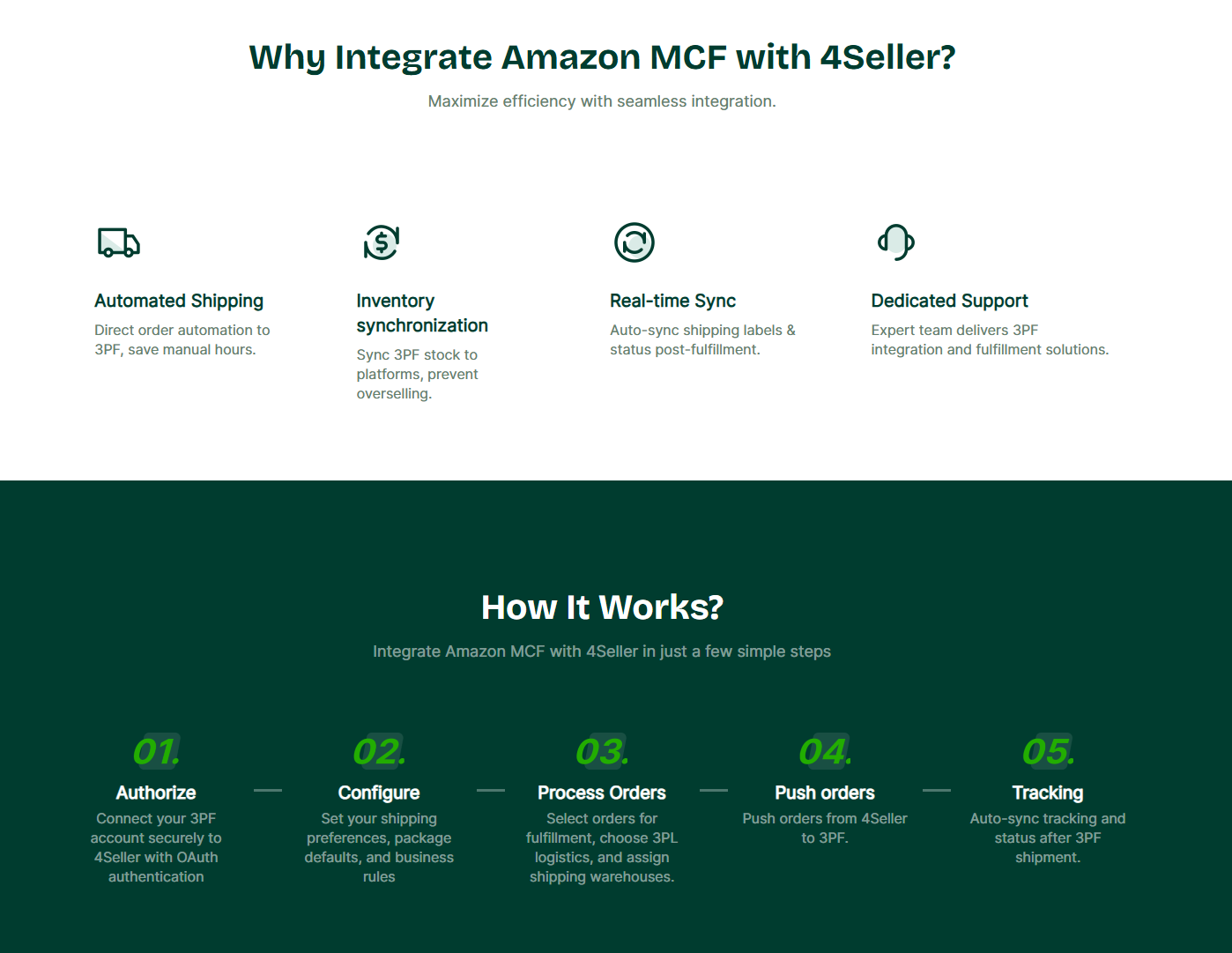
4Seller Easy MCF: The core logic is a “simpleton-style wizard.” It is as simple as ordering takeout. 4Seller provides a 4-step wizard: Authorize Store -> SKU Mapping -> Automation Settings -> Enable Sync. You don’t need to understand what “nodes” or “logic rules” are. Sellers only need to follow the step-by-step wizard within the 4Seller system: Link Store -> SKU Mapping -> Set Automatic Fulfillment -> Inventory Sync -> Enter Data Dashboard, to quickly run through the entire MCF process.
III. Core Feature Difference Comparison: Why 4Seller’s “Easy MCF” is More Advantageous?
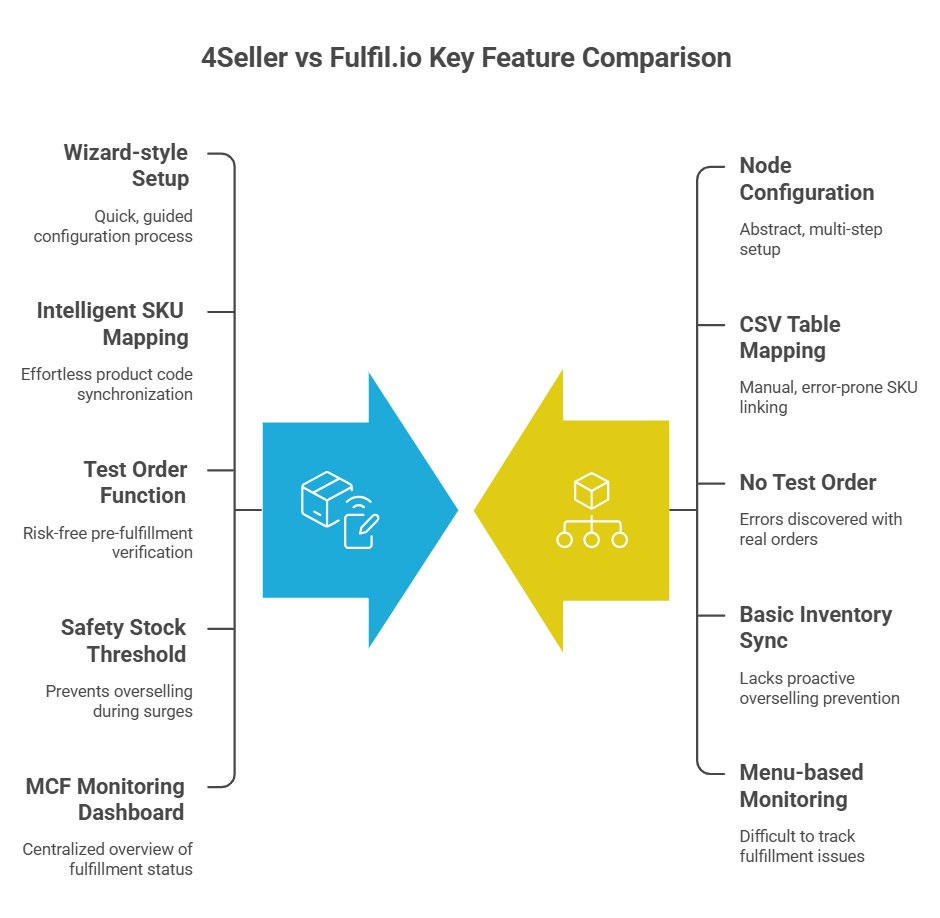
After objectively comparing the operation processes of both, although both can achieve MCF automation, 4Seller’s Easy MCF has significant advantages in ease of use, error prevention mechanisms, and refined management:
1. Minimalist Wizard-style Setup (Zero-Friction Setup) vs. Complex Node Configuration
-
Fulfil.io requires sellers to cross multiple menu levels (Create Location, Add Carrier, Write Automation Rules, Enable 3PL Plan) to complete the configuration, which is very abstract.
-
4Seller Easy MCF provides a one-stop simple four-step wizard. Sellers do not need to understand “3PL nodes” or write complex trigger rules. The system defaults to all eligible orders automatically flowing to MCF fulfillment after the setup is completed, greatly reducing learning costs and configuration time.
2. SKU Mapping: Say Goodbye to “Table Hell”
Matching SKUs from different platforms is a pain point for multi-channel fulfillment. If your Shopify SKU is Blue-S-Shirt while the Amazon SKU is AZ-BSS-001, a mapping error will lead to wrong delivery.
-
Fulfil.io mainly relies on traditional CSV table imports to perform 3PL SKU mapping. You need to repeatedly download, fill out, and upload complex CSV tables. If a single space is filled incorrectly in the table, the mapping will fail.
-
4Seller Easy MCF provides an extremely intelligent mapping solution:
-
Automatic Matching: If the platform SKU is exactly the same as the Amazon SKU, the system will automatically complete the mapping without manual intervention.
-
Powerful Bundle/Kit Mapping: In the visual interface, sellers can directly enable “Bundle SKU,” select the corresponding Amazon SKU, and adjust the quantity, easily solving fulfillment issues for multi-packs or combination sales. For example, you are selling a “3-piece set” on TikTok, but it is a single item on Amazon. In the 4Seller interface, you can just link them directly, and the system will automatically tell Amazon: “Deliver 3 single items for this order.”
-
Multi-dimensional Operation: It supports both individual editing on the interface and Excel/CSV batch import. The interface will visually display a “Mapping Progress Bar” and “Unmapped SKU” filters, so you can clearly see which SKUs have not been paired yet. At 4Seller, there are no “fish that slip through the net.”
-
3. Original “Test Order” Function (Risk-Free Test Order): Peace of Mind Before Sleeping
This is one of 4Seller’s most brilliant features. After completing the settings for logistics speed and packaging options, 4Seller’s Easy MCF provides a “Test Order” button. Sellers can simulate creating a test order and send it to Amazon before officially starting automatic fulfillment to verify if the entire process is unimpeded. You can immediately see whether Amazon has accepted the address and roughly how much the logistics fee is. This “sandbox rehearsal” gives sellers a great sense of security, ensuring that no errors occur when real orders arise.
-
Fulfil.io lacks this intuitive sandbox testing mechanism, and sellers often only discover configuration errors after a real order is generated.
4. Precise “Safety Stock” and Two-way Sync: Prevent “Order Surges” from Becoming “Disasters”
Traffic on TikTok Shop often explodes in an instant. If you only have 10 items but sell 20 on TikTok and Shopify at the same time, you face the risk of account downgrading.
Both support inventory synchronization, but 4Seller directly builds the Safety Stock Threshold setting into the wizard. Sellers can reserve a certain amount of inventory when syncing Amazon inventory to other platforms (such as TikTok or Shopify), effectively preventing overselling issues caused by concurrent sales on multiple platforms. In the setup wizard, you can directly set a Buffer (buffer zone). For example: when Amazon inventory has only 5 pieces left, 4Seller will automatically make TikTok and Shopify display “Sold Out.” In this way, even if orders surge in the early morning, you can handle it calmly and will never oversell.
5. Dedicated MCF Monitoring Dashboard: Instead of Finding Problems, Let Problems Find You
In Fulfil.io, if an order fulfillment fails, you often have to flip through several menu levels or check email notifications.
4Seller built a dedicated control panel for Easy MCF. Once the setup is complete, sellers can see the entire MCF business at a glance on the Dashboard. The panel not only displays sales data but also highlights warnings for Failed Orders, No Tracking Orders, Unmapped SKUs, and Inventory Sync Failures, etc. At the same time, there are email notifications for order fulfillment failures, helping sellers intervene and handle them at the first opportunity to avoid logistics delays.
It is like a “command center.” Once there is an address error, insufficient inventory, or mapping disconnection, the dashboard will directly highlight a red warning. You don’t need to check thousands of orders; you only need to focus on those few “failed items.” This “exception management” thinking can save the operations team at least 2 hours of time every day.
IV. Say Goodbye to “Enterprise-level Premium”: Seeing Who Can Help You Save More from the Perspective of ROI
When evaluating Amazon MCF fulfillment tools, understanding the total cost of ownership is as important as the functions themselves. The pricing models of Fulfil.io and 4Seller target completely different business scales.
1. Fulfil.io: Enterprise-level Investment
Fulfil.io is an enterprise-level ERP, which means its pricing is usually customized and the entry threshold is high.
-
High Subscription Fees: Monthly fees are usually counted in thousands of dollars, suitable only for large brands with high annual GMV and complex multi-warehouse management needs.
-
Implementation Fees: Since the system is very complex, expensive “Onboarding” or “Setup” fees are usually required, with professional teams assisting in configuring MCF automation rules.
-
ROI: Most suitable for businesses with annual sales above 5 million USD.
2. 4Seller: Scalable and Transparent Pricing
In contrast, 4Seller follows a flexible SaaS model, aiming to scale with the seller’s growth.
-
Affordable Entry Threshold: 4Seller provides more competitive starting prices, even including a free version or low-cost solutions for small and medium-sized sellers, enabling Amazon MCF automation without a huge investment.
-
Value-added of Easy MCF: 4Seller’s Easy MCF tool is usually included in standard packages, allowing you to sync TikTok Shop, Shopify, and eBay inventory to Amazon FBA at an extremely low cost.
-
No Hidden Setup Fees: Thanks to the “wizard-style” setup, you don’t need to hire external consultants, saving thousands of dollars in implementation costs.

3. Amazon MCF Fulfillment Fees (Common to Both)
Regardless of which tool you choose, you still need to pay MCF delivery fees to Amazon:
-
Delivery Fee: Calculated based on product size, weight, and delivery speed (Standard, Expedited, Priority).
-
Storage Fee: Monthly inventory fee at Amazon fulfillment centers.
-
Blank Box and Block Amazon Logistics: If you need to use unbranded packaging to maintain the brand image of your standalone store, a small extra fee is required.
Although both tools can manage these costs, 4Seller’s Easy MCF dashboard can more clearly display failed orders and sync errors, effectively avoiding “hidden costs” caused by inventory backlog or manual operation errors.
V. Summary
Objectively speaking, Fulfil.io is a set of heavy-duty ERP suitable for large enterprises possessing extremely complex supply chains and requiring highly customized logistics rules.
However, for most small-to-medium or mature e-commerce sellers pursuing efficiency and wishing to quickly expand multiple platforms (such as TikTok, Shopify, WooCommerce, eBay, etc.), 4Seller’s Easy MCF provides a superior solution. 4Seller delivers a “dimensionality reduction strike” to tedious ERP configurations. Through intelligent automatic SKU mapping, a risk-free test order process, an intuitive exception interception dashboard, and out-of-the-box automation, it truly makes multi-channel MCF fulfillment “Easy,” significantly improving the operational efficiency of e-commerce teams.
For reference: [Easy MCF user guide] 【4Seller X Amazon MCF Introduction】
Contact us: [WhatsApp] / [LinkedIn] / [Instagram] / [Facebook] / [E-mail: support@4seller.com]
- Multi Channel Order Management
- TikTok Shop
- Amazon
- Temu
- About 4Seller
- Shopify
- Multi Channel Inventory Management
- Amazon MCF&FBA
- Seller Tips
- Listing Management
- Marketplace News
- Amazon Shipping
- DHL Express
- UPS
- Amazon MCF
- FedEx
- eBay
- Shein
- Creator Bulk Invite
- Inventory Sync
- GLS
- Multi-channel Store
- Walmart WFS
- Walmart
- Royal Mail
- Shipping Integration
- Kaufland
- DHL Parcel
- Seller Story
- Beginner Tutorial
- 3PL
- Walmart MCS
- Shipping Label
- Deutsche Post
- WooCommerce
- OTTO
- Platform Integration
- PayPal Tracking Sync
- UniUni
- Yodel
- ShipHero
- SPU Catalog
- Stripe Tracking Sync
- USPS
- GOFO
- CIRRO
- Correos
- Correos Express
- DPD
- Etsy
- Evri
- FBM
- Request Review
- Logistics Rule
- CaiNiao
- BRT
- Chronopost
- Poste Italiane
- Cdiscount
- AliExpress
- OMS
- DHL
- ShipBob
- WFS
- Price Sync
 17 Dec,2024
- 17 Dec,2024