No Need to Replace Your Legacy Inventory System! Sync External Stock to All Sales Channels with 4Seller + Google Sheets
 By Jennie13 Nov,2026
Introduction

If you’re a multi-channel ecommerce seller, you’ve probably faced this inventory management challenge: your warehouse team uses an older inventory system, a legacy WMS, or manual spreadsheets to track stock. However, your existing tools can’t automatically send inventory updates to your online stores.

You have two common options.

You can switch to an entirely new ERP system. This means extensive data migration, staff retraining, and a real risk of disrupting your daily operations.

Alternatively, you can build a custom API integration between your existing system and a multichannel inventory management platform. This requires developers to write code, monitor system stability, handle integration failures, and maintain the connection over time. That’s a lot of work for small and mid-sized teams.

Most sellers don’t want to rebuild their warehouse workflows. They simply need a straightforward, low-cost solution: keep managing stock with their existing processes and automatically push inventory updates to every sales channel.

That’s exactly what the Google Sheets integration with 4Seller is designed to do.

How Google Sheets Inventory Sync Works with 4Seller

Your existing warehouse management system (WMS) can remain part of your workflow. Google Sheets acts as the inventory data source for 4Seller.

Simply update the SKU and available quantity in your Google Sheet whenever stock changes. 4Seller automatically retrieves the latest inventory data, matches the corresponding SKUs, and pushes updated stock quantities to your connected sales channels.

The shortest sync interval is 15 minutes. Once configured, the process runs automatically without requiring you to log in to each marketplace and manually update stock.

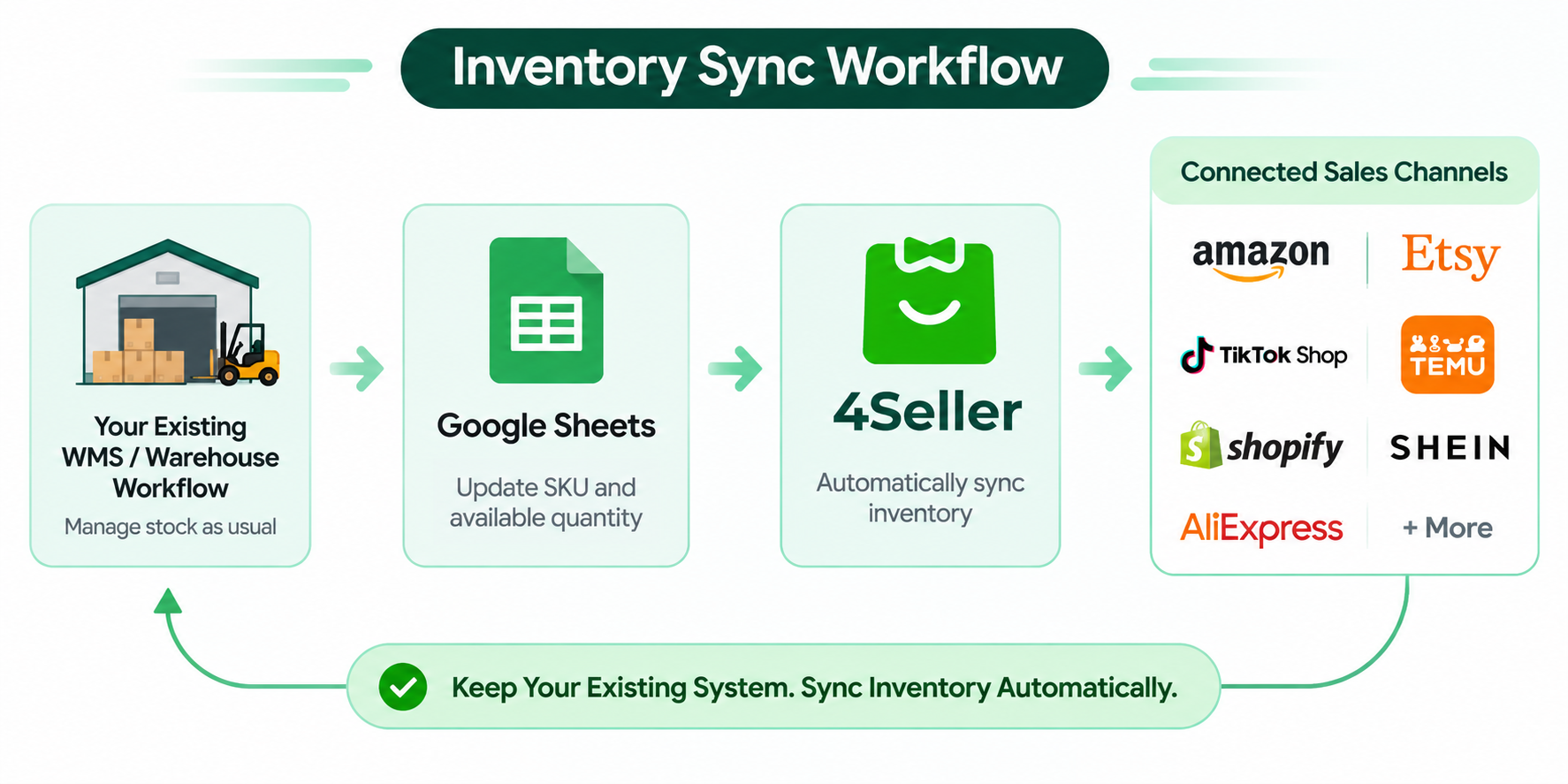
How the Inventory Sync Workflow Works

Your existing WMS / Warehouse Workflow → Google Sheets → 4Seller → Connected Sales Channels


This solution is particularly useful for:
-
Sellers using legacy inventory management systems or local WMS solutions.
-
Businesses that manage stock through Google Sheets or other manual spreadsheets.
-
Third-party fulfillment warehouses that prefer recording inventory changes in shared spreadsheets.
-
Multi-marketplace sellers who want to avoid custom API development.
-
Warehouse teams that need a simple inventory update process without learning complex ERP software.
Important: This is a scheduled polling sync, not a real-time, millisecond-level inventory update. For flash sales, livestream shopping, or high-volume products with frequent stock changes, consider using a native real-time inventory synchronization solution instead.
Real-World Example: Managing 3,000+ SKUs Across Seven Sales Channels
One of our multi-channel sellers manages more than 3,000 SKUs across seven sales channels: Amazon, Etsy, TikTok Shop, Temu, Shopify, SHEIN, and AliExpress.
Previously, their operations team relied on offline spreadsheets to manage inventory. Every day, they had to manually update stock quantities across multiple platforms.
The process was repetitive and time-consuming. Inconsistent inventory data often led to overselling, resulting in canceled orders, negative customer reviews, and potential damage to seller account performance.
After connecting Google Sheets to 4Seller, they were able to simplify their inventory workflow without replacing their existing stock management process.
Here's how it works:
-
Warehouse staff update SKU information and available quantities in a shared Google Sheet whenever inventory changes.
-
4Seller automatically retrieves the latest stock data from the spreadsheet.
-
The system matches SKUs and synchronizes updated inventory with their connected sales channels.
With this setup, the seller can:
-
Reduce manual work: No need to update inventory separately across seven sales channels.
-
Minimize human errors: Use one centralized spreadsheet as the inventory data source.
-
Lower overselling risks: Keep stock quantities more consistent across connected marketplaces.
-
Avoid additional training: Warehouse staff continue using a familiar spreadsheet-based workflow.
-
Save time for business growth: Operations teams can focus more on advertising, product research, and sales growth instead of repetitive inventory updates.
Instead of replacing their existing inventory management system, they simply added an automated inventory synchronization process with Google Sheets and 4Seller.
How to Set Up Google Sheets Inventory Sync in 4Seller
You don't need a developer to get started. Your operations team can complete the configuration by following these steps.
Step 1: Prepare Your Google Sheet
Create a Google Sheets spreadsheet with the essential inventory information.
At a minimum, include these two columns:
-
SKU: Your product's unique stock keeping unit.
-
Available Quantity: The current available stock quantity.
Make sure your SKUs match the corresponding product SKUs in 4Seller.
Step 2: Connect Google Sheets to 4Seller
Log in to your 4Seller account, enable the Google Sheets data source, authorize access, and select the spreadsheet you want to use.
Step 3: Map Your Inventory Fields
Match the columns in your Google Sheet with the corresponding inventory fields in 4Seller.
For example:
| Google Sheets Field | 4Seller Inventory Field |
|---|---|
| SKU | SKU |
| Available Quantity | Stock Quantity |
This ensures that inventory updates are assigned to the correct products.
Step 4: Set Your Sync Frequency
Choose how often 4Seller should retrieve inventory data from Google Sheets.
The minimum sync interval is 15 minutes.
Step 5: Enable Inventory Updates for Your Sales Channels
Check your connected marketplaces in 4Seller and enable inventory synchronization for each channel where you want to update stock.
Step 6: Test Your Inventory Sync
Before relying on automatic synchronization, run a simple test:
-
Open your Google Sheet.
-
Change the available quantity of a test SKU.
-
Wait for the next scheduled sync.
-
Check whether the inventory quantity has been updated on the corresponding marketplace listing.
You can also configure additional safeguards, such as failure alerts and inventory buffers, to further reduce the risk of overselling.
Key Benefits of Using 4Seller + Google Sheets
Why choose Google Sheets inventory synchronization instead of replacing your entire inventory management system?
Here are the key advantages.
1. Keep Your Existing Inventory System
You don't need to replace your legacy ERP or WMS or completely redesign your warehouse workflow.
Continue using your existing processes while adding a simple inventory synchronization solution.
2. No Custom Coding Required
Forget about building complicated API integrations or hiring developers to maintain custom connections.
Connect Google Sheets to 4Seller and configure your inventory synchronization directly.
3. Update Multiple Sales Channels from One Source
One spreadsheet update can trigger inventory synchronization across multiple connected marketplaces.
Instead of logging in to every store individually, manage stock updates from one centralized source.
4. Simple Workflow for Warehouse Teams
Google Sheets is familiar and easy to use.
Warehouse employees only need to update the relevant spreadsheet cells. They don't have to learn how to operate a complex ERP system just to change inventory quantities.
5. Transparent Inventory Sync Records
Keep track of inventory synchronization activities and identify which SKUs have failed to sync.
With accessible sync records, your operations team can quickly investigate issues and make corrections when necessary.
Frequently Asked Questions (FAQ)
1. Is Google Sheets inventory synchronization suitable for every seller?
It works particularly well for sellers and warehouse teams that manage inventory externally and don't require instant real-time stock updates.
If you sell high-demand products through flash sales or livestream shopping, a native real-time inventory synchronization solution may be more suitable.
2. What if warehouse staff enter the wrong inventory quantity?
You can configure inventory buffers and limits in 4Seller to help reduce the risk of overselling.
Google Sheets also provides version history, allowing you to review previous changes and trace inventory updates when necessary.
3. Can I add extra columns, such as batch numbers or warehouse notes?
Yes. SKU and available quantity are the only required fields for inventory synchronization. Other columns can be used as reference notes.
Final Thoughts: Keep Your Existing Workflow and Simplify Inventory Sync
You don't have to replace an inventory management system that already works just to achieve multi-channel inventory synchronization.
With 4Seller + Google Sheets, you can maintain your existing stock management workflow while adding a simple, low-cost automated synchronization process.
Reduce repetitive manual updates, minimize inventory errors, and lower the risk of costly overselling across multiple sales channels.
Keep your existing system. Simplify your inventory management with 4Seller.


 17 Dec,2024
- 17 Dec,2024