Popular Posts
- Multi Channel Order Management
- TikTok Shop
- Amazon
- Temu
- About 4Seller
- Shopify
- Multi Channel Inventory Management
- Amazon MCF&FBA
- Seller Tips
- Listing Management
- Marketplace News
- FedEx
- UPS
- Amazon MCF
- DHL Express
- Amazon Shipping
- eBay
- Shein
- Creator Bulk Invite
- Inventory Sync
- GLS
- Multi-channel Store
- Walmart
- Walmart WFS
- Shipping Integration
- Kaufland
- Royal Mail
- Seller Story
- Beginner Tutorial
- 3PL
- WooCommerce
- DHL Parcel
- Walmart MCS
- Shipping Label
- OTTO
- Deutsche Post
- Platform Integration
- PayPal Tracking Sync
- AliExpress
- Yodel
- ShipHero
- SPU Catalog
- Stripe Tracking Sync
- USPS
- UniUni
- GOFO
- CIRRO
- Correos
- Correos Express
- DPD
- Etsy
- Evri
- FBM
- Request Review
- Logistics Rule
- CaiNiao
- BRT
- Chronopost
- Poste Italiane
- Cdiscount
- OMS
- DHL
- WFS
- ShipBob
- Price Sync
How to Get Automated Amazon Review Requests to Boost Ratings for Free?
 By Joline24 Dec,2025
For FBM sellers, collecting Amazon reviews often becomes a low-priority task not because it is unimportant, but because it is operationally fragile. Review requests must be sent within a narrow time window, only once per order, and under strict communication rules—one missed day or one wrong message, and the opportunity is lost.
Beyond these rules lies a hidden challenge: before a request can even be sent, sellers must decide which orders to exclude, such as returns, refunds, discounted orders, B2B purchases, low-value shipments, or buyers with previous negative feedback.
As order volume grows, manually tracking which orders qualify becomes unrealistic. Requests either get skipped entirely or handled inconsistently, leaving thousands of successfully delivered orders without any feedback. This operational bottleneck is where most Amazon review strategies quietly fail.What is an Amazon review?
An Amazon review is buyer-submitted feedback after an order is completed, reflecting the product experience and indirectly the seller’s reliability. Reviews influence far more than social proof. They affect conversion rates, ad efficiency, organic ranking, and long-term listing stability.
For FBM sellers, slow review growth is rarely a service issue. It is a process issue. Reviews do not accumulate because sellers hesitate to request them without knowing whether an order is “safe” to ask from. Without a structured way to filter eligible orders, even satisfied buyers are left unprompted.Why order filtering is the hidden bottleneck in Amazon review growth?
Before sending any review request, FBM sellers must silently answer multiple questions:
- Should returned or exchanged orders be excluded?
- Should orders with product discounts be skipped?
- What about shipping discounts or promotional campaigns?
- Should B2B orders be included?
- Should buyers who previously left negative feedback be excluded?
- Should recent return-heavy buyers be filtered out?
This forces sellers into one of two behaviors:
Either request reviews blindly and accept risk, or stop requesting reviews altogether.Both outcomes suppress review growth.
Why do Amazon sellers need to actively request reviews after delivery?
Many sellers assume Amazon automatically requests reviews once an order is delivered. For FBM orders, this is not the case.Amazon provides a limited review request window between 5 and 30 days after delivery. If sellers do nothing, Amazon does nothing. Once the window passes, the opportunity is permanently lost.
This puts FBM sellers in a difficult position. Not only must they remember to request reviews on time, they must also ensure the order meets multiple internal risk criteria. One wrong request can trigger complaints or policy scrutiny. One missed request means zero chance of feedback.
The issue is not awareness. It is execution at scale.
How can sellers Request a Review in Amazon Seller Central?
Amazon offers several compliant ways to request reviews, all governed by strict timing and content rules.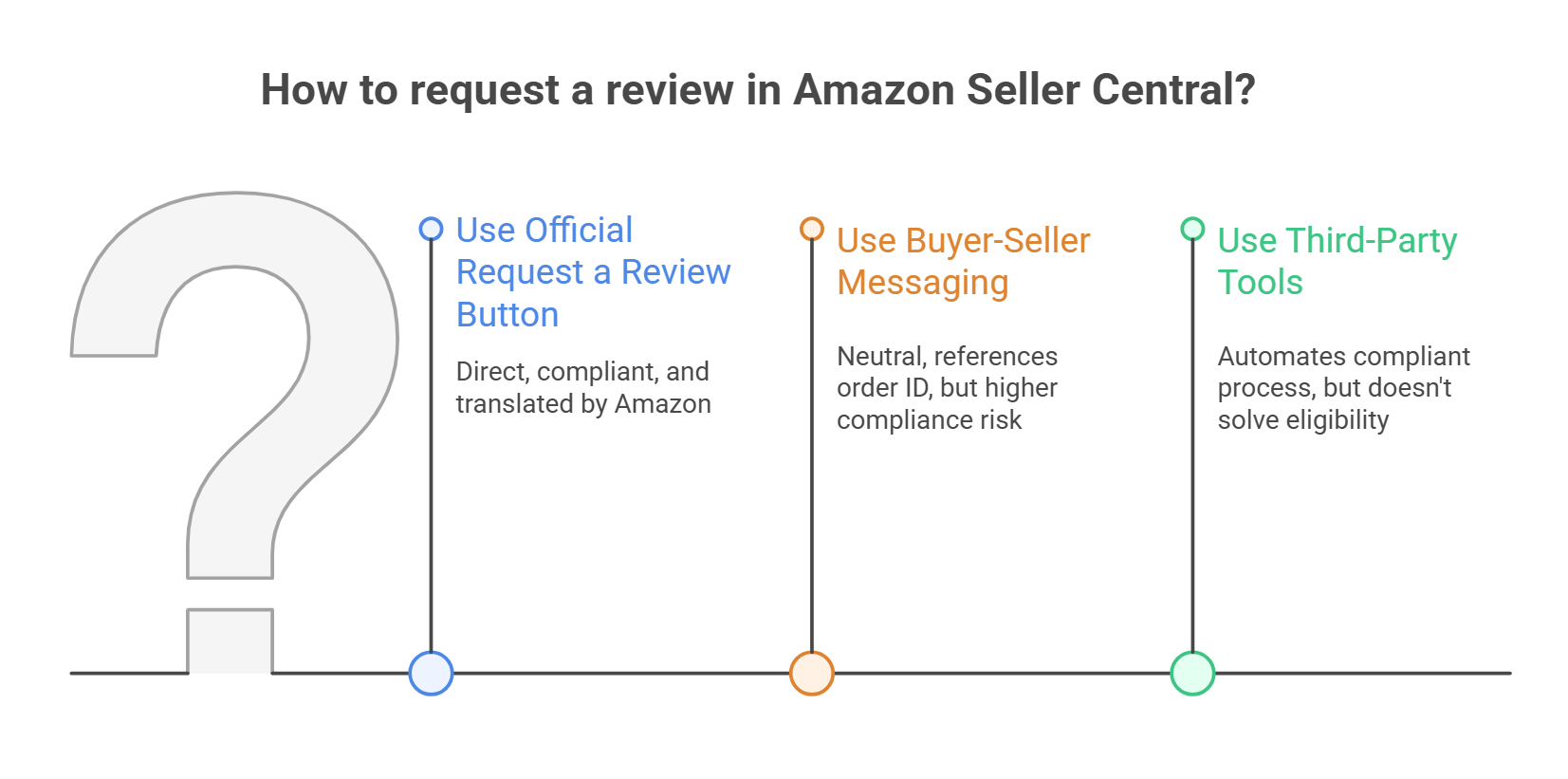
Sellers may also use Buyer-Seller Messaging under limited conditions, provided the message remains neutral, references a valid order ID, and avoids prohibited language. This method carries higher compliance risk and lower delivery rates due to buyer opt-outs.
Some sellers use third-party tools that programmatically trigger Amazon’s official review request mechanism. These tools do not bypass Amazon rules; they automate the same compliant process.
However, none of these methods solve the eligibility problem. Amazon does not tell sellers which orders should be excluded. That decision is left entirely to the seller.
What are the pros and cons of different Amazon review request methods?
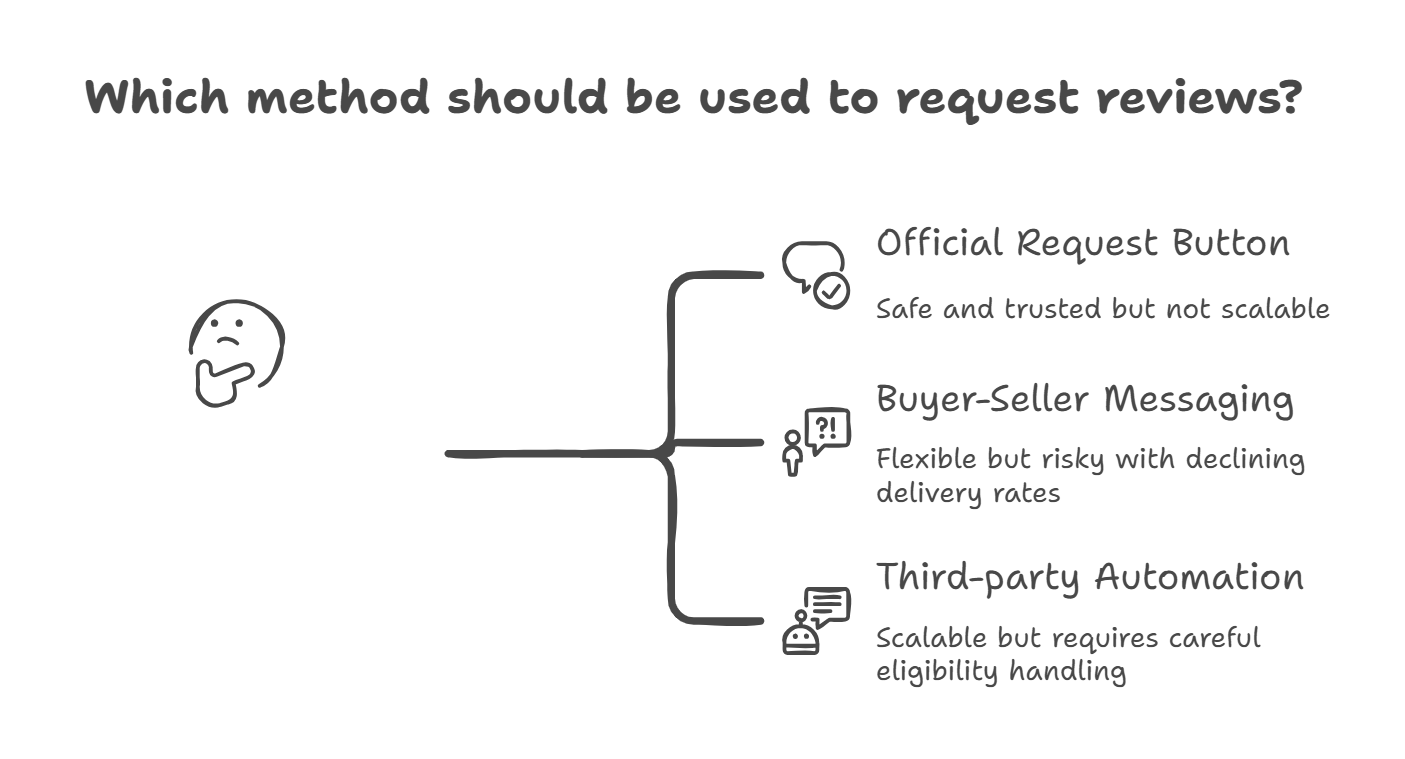
Buyer-Seller Messaging offers flexibility but introduces risk. Message delivery rates decline over time, and even small wording mistakes can trigger enforcement. Sellers must also manually ensure the order qualifies for outreach.
Third-party automation tools can scale review requests, but only if they handle eligibility correctly. Tools that simply send requests without filtering orders shift risk rather than eliminate it.
In practice, the deciding factor is not how the request is sent, but which orders are allowed to trigger it.
How 4Seller ERP gives FBM sellers review freedom through rule-based automatic request campaign?
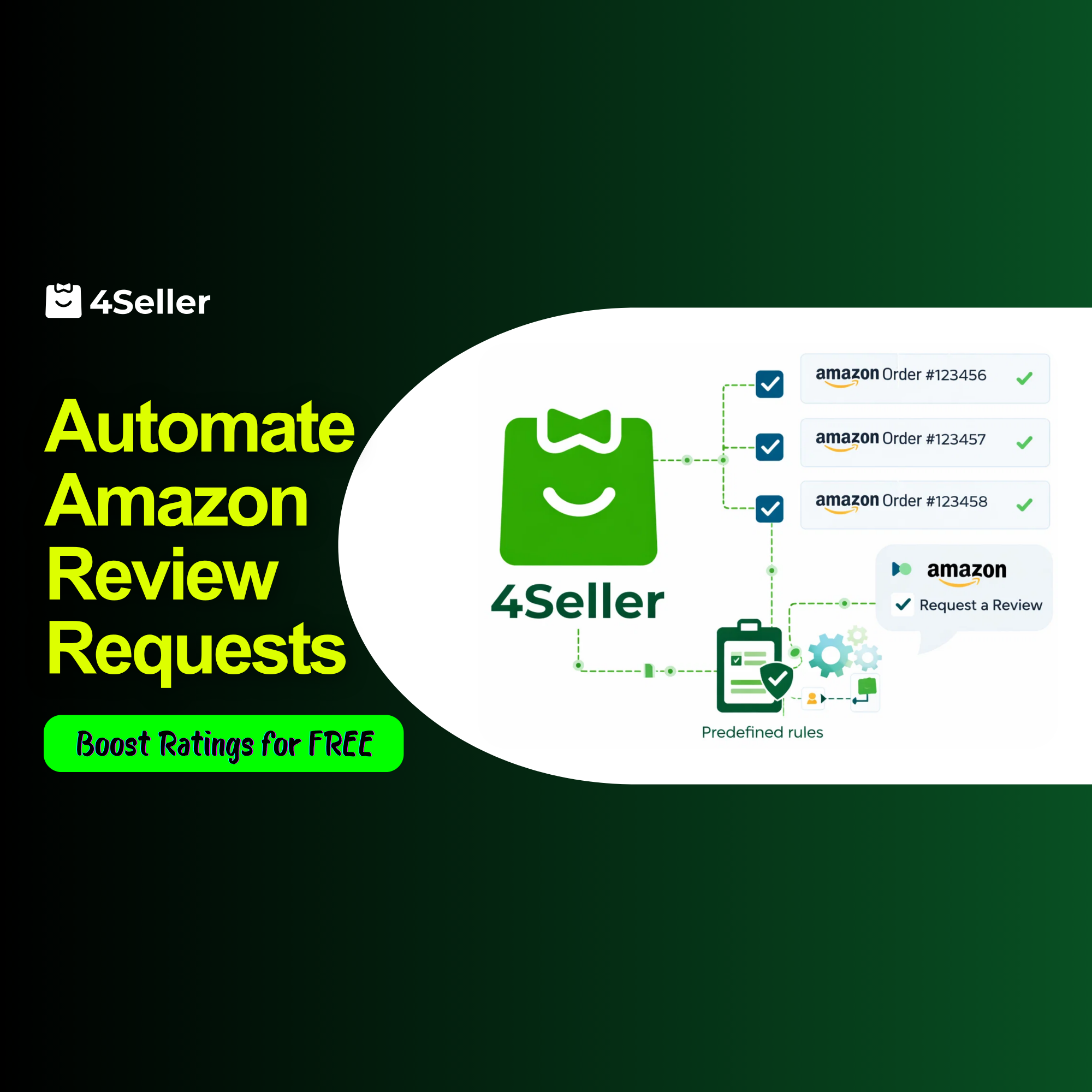
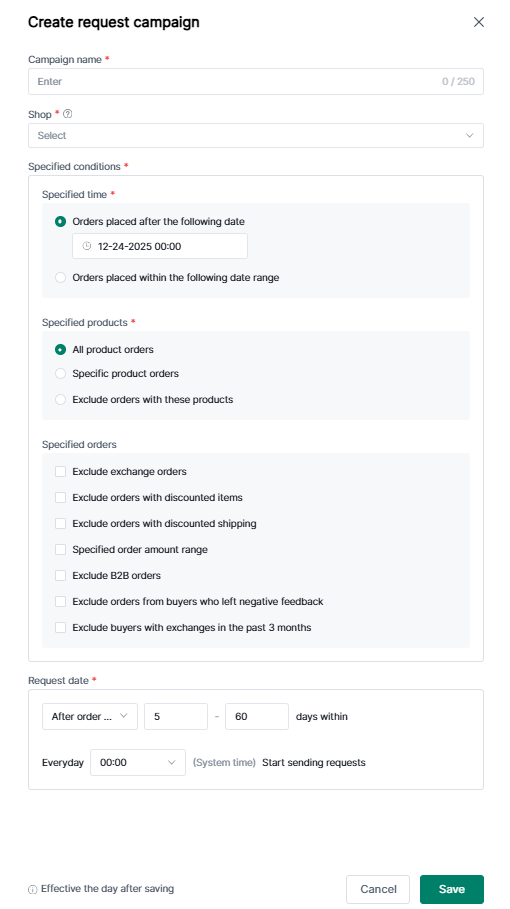
4Seller ERP solves the review problem at its root by eliminating manual order filtering.Instead of selecting orders one by one, sellers define review eligibility rules once, and 4Seller applies them automatically across all FBM orders.
| Filter | Why it matters | Benefit |
| Exclude returned/exchanged orders | Buyers who experienced issues are unlikely to leave positive reviews | Avoid annoying buyers, reduce risk of negative feedback |
| Exclude discounted product orders | Promotional buyers may leave biased or irrelevant reviews | Focus on genuine paid orders for meaningful feedback |
| Exclude discounted shipping orders | Similar to product discounts; protects review quality | Higher chance of authentic positive reviews |
| Exclude B2B orders | Business purchases rarely leave reviews | Avoid wasted requests |
| Exclude buyers with previous negative feedback | Persistent detractors may escalate complaints | Prevent additional negative reviews |
| Exclude buyers with recent returns | Frequent returners often provide critical feedback | Reduce compliance risk |
| Apply SKU/product-specific rules | Some products may be new, experimental, or sensitive | Avoid sending requests too early or for unsuitable items |
| Apply order value thresholds | Very low-value orders may not motivate buyer responses | Focus efforts on orders most likely to yield reviews |
Sellers can choose to:
Include all products, specific products, or exclude selected SKUs
- Exclude returned or exchanged orders
- Exclude discounted product orders
- Exclude discounted shipping orders
- Exclude B2B orders
- Exclude buyers with poor feedback history
- Exclude buyers with recent returns
- Apply order value thresholds
- No manual screening.
- No spreadsheet checks.
- No policy guessing.
Each request uses Amazon’s standardized template and infrastructure, ensuring full compliance while removing human error.
Importantly, this automation applies only to FBM orders. FBA orders are excluded by design, since Amazon already handles review requests automatically. When a store is first authorized, 4Seller synchronizes orders from the last 90 days, and review rules apply only to eligible orders within that window.
Final takeaway
Amazon reviews are not limited by buyer willingness. They are limited by seller operations.For FBM sellers, the real upgrade is not sending more requests, but sending the right requests without thinking about them. When order eligibility is automated and review requests become invisible, review growth stops being a task and starts becoming a byproduct.
That is what review freedom looks like in 2026.
All Topics
- Multi Channel Order Management
- TikTok Shop
- Amazon
- Temu
- About 4Seller
- Shopify
- Multi Channel Inventory Management
- Amazon MCF&FBA
- Seller Tips
- Listing Management
- Marketplace News
- FedEx
- UPS
- Amazon MCF
- DHL Express
- Amazon Shipping
- eBay
- Shein
- Creator Bulk Invite
- Inventory Sync
- GLS
- Multi-channel Store
- Walmart
- Walmart WFS
- Shipping Integration
- Kaufland
- Royal Mail
- Seller Story
- Beginner Tutorial
- 3PL
- WooCommerce
- DHL Parcel
- Walmart MCS
- Shipping Label
- OTTO
- Deutsche Post
- Platform Integration
- PayPal Tracking Sync
- AliExpress
- Yodel
- ShipHero
- SPU Catalog
- Stripe Tracking Sync
- USPS
- UniUni
- GOFO
- CIRRO
- Correos
- Correos Express
- DPD
- Etsy
- Evri
- FBM
- Request Review
- Logistics Rule
- CaiNiao
- BRT
- Chronopost
- Poste Italiane
- Cdiscount
- OMS
- DHL
- WFS
- ShipBob
- Price Sync
Popular Posts
 17 Dec,2024
Table of Content
Popular Posts
- 17 Dec,2024

Back to top