- Multi Channel Order Management
- TikTok Shop
- Amazon
- Temu
- About 4Seller
- Shopify
- Seller Tips
- Multi Channel Inventory Management
- Amazon MCF&FBA
- Listing Management
- Marketplace News
- eBay
- Amazon Shipping
- Amazon MCF
- DHL Express
- FedEx
- UPS
- Shein
- Creator Bulk Invite
- Multi-channel Store
- Inventory Sync
- GLS
- Beginner Tutorial
- Walmart
- Walmart WFS
- Shipping Integration
- Seller Story
- Kaufland
- Royal Mail
- 3PL
- Platform Integration
- Shipping Label
- OTTO
- WooCommerce
- Deutsche Post
- Walmart MCS
- GOFO
- DHL Parcel
- Yodel
- SPU Catalog
- PayPal Tracking Sync
- ShipHero
- USPS
- Stripe Tracking Sync
- AliExpress
- UniUni
- CIRRO
- Correos
- Poste Italiane
- Chronopost
- BRT
- CaiNiao
- Logistics Rule
- Request Review
- FBM
- Evri
- Etsy
- DPD
- Correos Express
- Cdiscount
- WFS
- DHL
- OMS
- Price Sync
- ShipBob
How to Sell on TikTok Shop in the US (2026)? (Step-By-Step)
 By Anna30 Oct,2026
Selling products on social media platforms like TikTok Shop is becoming more and more popular, because you can reach a large number of users and potential buyers.Getting started on TikTok Shop as a seller involves creating a shop through TikTok Shop Seller Center, submitting the required information for verification, and setting up your products and fulfillment operations.
In this guide, we'll explain what TikTok Shop is, how to open a TikTok Shop in the US, how to list products, and how to manage orders, inventory, and shipping as your business grows. We'll also show how 4Seller helps sellers manage TikTok Shop and other sales channels in one place.
What is TikTok Shop?
TikTok Shop is an ecommerce feature integrated within TikTok that enables sellers and creators to showcase and sell products for the TikTok community, who can discover and purchase directly within the app.
TikTok Shop provides 3 ways for customers to shop:

- Live shopping. When doing a livestream, sellers or creators can pin a product on screen, allowing customers to simply tap and browse through the products they're offering.
- Shoppable videos. Sellers or creators can add a product to an in-feed video, making it easy for customers to tap and make a purchase.
- Product showcase. Once your shop is set up, users will be able to view your shop from your profile, allowing them to shop directly from a brand or creator account.
Benefits of selling products on TikTok Shop
Here are a list of advantages of opening a TikTok Shop:- Reach a Wider Audience and Increase Brand Awareness: TikTok Shop gives sellers opportunities to introduce products to audiences through videos, livestreams, and creator content.
- Boost Sales: Customers can discover products in content and purchase them within TikTok, creating a more direct path from product discovery to checkout.
- Get to Know Your Audience: Comments, livestream interactions, reviews, and customer feedback can help sellers understand what shoppers want.
- Create a Seamless Shopping Experience: TikTok Shop brings product discovery and shopping together within the app.
- Work with Affiliates and Creators: Sellers can collaborate with TikTok creators through the affiliate program, subject to current program eligibility and terms.
- Reach Customers Through Multiple Content Formats: Shoppable videos, LIVE Shopping, and the Shop tab give sellers different ways to present products.

How much does it cost to sell on TikTok Shop?
We need to also understand how much it costs to sell on TikTok Shop so we can properly set the profit margins and price our products.Opening a TikTok Shop in the US is free, with no registration or monthly subscription fee.
TikTok Shop charges a standard 6% referral fee on qualified completed orders, although rates may vary by product category or promotional programs.
For eligible refunds, a refund administration fee may apply, calculated at 20% of the refunded referral fee, capped at $5 per SKU.
Sellers also need to budget for shipping costs, which depend on the fulfillment method, package details, and destination, as well as optional advertising expenses.
If you work with TikTok Shop affiliates, creator commissions are an additional cost based on the commission rate you set and eligible sales.
For sellers using third-party fulfillment services such as Amazon MCF, additional fulfillment fees apply, while 4Seller offers free multichannel management for product listings, orders, inventory synchronization, and shipping.
How to set up a TikTok Shop in USA?
Ready to set up your shop on TikTok? Before we get started, let's quickly review what documents are required to create a TikTok Shop in USA.Documents required:
Individual seller:
- Legal name and date of birth
- Email address and phone number
- Valid identity document accepted by TikTok
- Residential address and tax identity information requested during onboarding
Business sellers:
- Registered business name and business address
- Business registration or formation documents
- Employer Identification Number (EIN) or other requested tax details
- Information and identification documents for the primary business representative
- Additional ownership, address, or verification information when requested
Confirm the current requirements in TikTok Shop Seller Center before applying.
How to start selling your products on TikTok Shop?We are gonna unpack the whole process in just 7 steps.
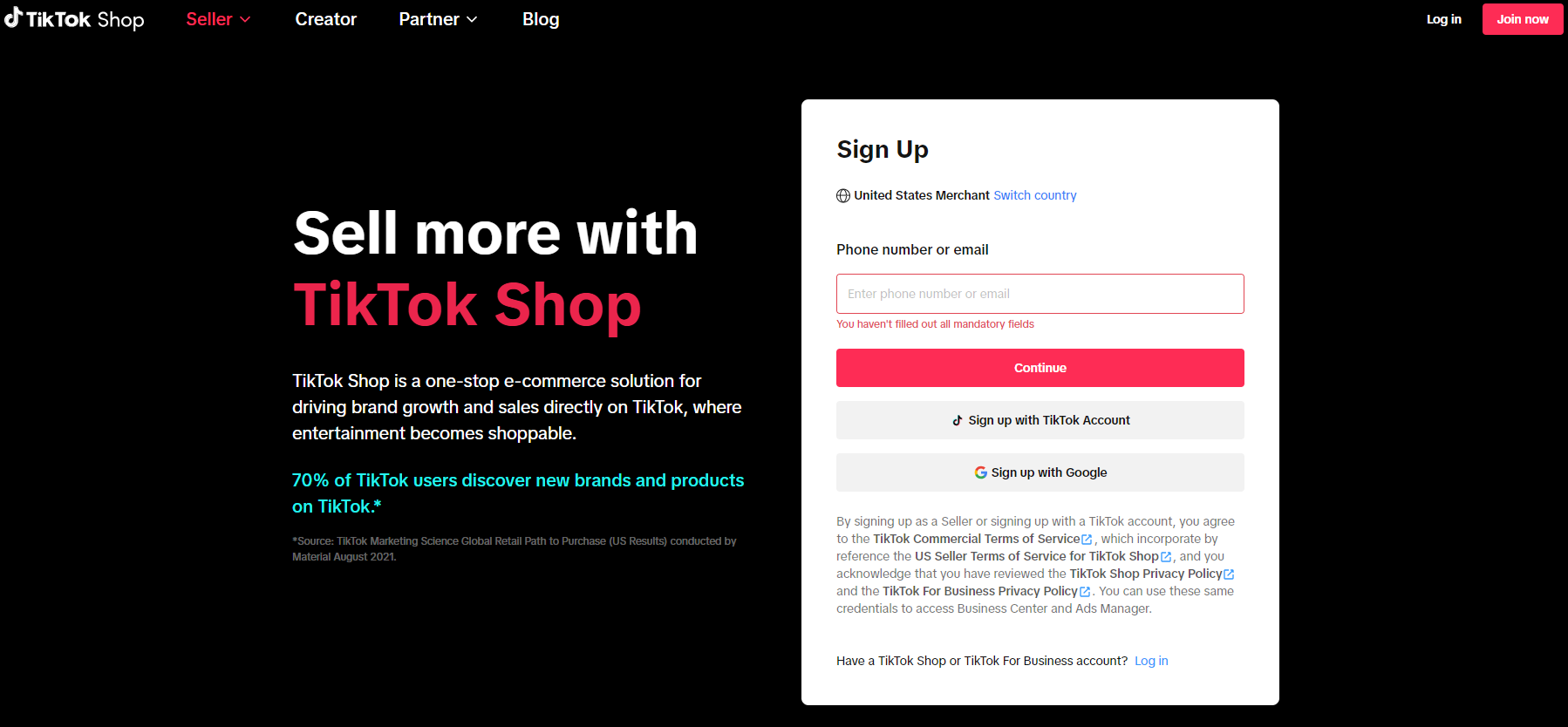
Step 1: Create a TikTok Shop seller account
Open TikTok Shop Seller Center for the US and sign up using an available registration method, such as your email address, phone number, or eligible TikTok account. Follow the on-screen instructions to verify your contact details and create your login.
The original article included screenshots of the sign-up process. Keep them only if the current Seller Center interface still matches; otherwise, replace them with updated screenshots.
Step 2: Choose your business type and upload verification documents
Select the seller or business type that accurately describes your business. Enter the requested personal or company information and upload the supporting documents.
Make sure the information matches your official records. Differences in legal names, addresses, or tax details may delay the review process.
Continue to confirm all your information and click Submit.
Congratulations! You've finished the onboarding application.

Your account will be under TikTok review before you can start selling products. You will be notified by email within 3-5 days once the review is completed.
Step 3: Verify your tax info
In the meantime, you will need to add your tax information so you can start selling and declare taxes for your shop. TikTok Shop requires that all sellers complete the U.S. Tax Identity Information Interview. US businesses/individuals need to fill in W9 Form information.

Step 4: Set up warehouse and shipping service
Before adding products to sell on TikTok, you will need to set up your store's warehouse/pickup address to show where your products will be shipped from as well as add a return warehouse address. You can set your return address to be the same as the pickup address, or you can fill in a different address.

Then review the available shipping options in Seller Center. Depending on your shop's eligibility and settings, you may be able to use TikTok Shipping or Seller Shipping. Confirm the available methods and requirements for your account.

Step 5: Add your first product
1. Product that has been added to TikTok Shop will not be visible until document verification is completed.
2. Be aware that it takes the TikTok team around 24 hours to review and approve your product submission, so until they do, you'll see it marked as 'Pending'.
There are many ways for you to upload your products to TikTok Shop.

b. TikTok Shop Seller Center also allows you to bulk upload products by downloading a template.
c. If you sell on other channels, you can also use 4Seller to manage and publish product listings to TikTok Shop and other supported marketplaces. This helps reduce repetitive listing work and keeps your multichannel catalog organized.
How to sync products from Shopify to TikTok Shop
How to sync products from Amazon to TikTok Shop
Step 6: Bind bank account
Once TikTok has verified your business documents, you will need to bind a bank account to your shop so you can get paid for purchases and process returns.
- For individual sellers, the Account Name needs to be the same as the registered name.
- For business sellers, the Account Name needs to be the same as the company name.

Step 7: Connect your shop to a TikTok account
Link the official TikTok account associated with your shop through the account-linking settings in Seller Center. This account can represent your shop and support eligible commerce content, such as shoppable videos and LIVE Shopping.
Go to My Account > Linked Accounts to link your TikTok account to your TikTok Shop.

This linked TikTok account will officially represent your shop on TikTok. Your official account is automatically granted permission for e-commerce LIVE and videos, so sales can be generated directly by the account. It will also be the TikTok account where your ads will be displayed.
How to Manage TikTok Shop Listings, Orders, and Inventory
Launching your shop is only the beginning. As orders increase or when you sell on several marketplaces, managing products, stock, and orders separately can create extra work and increase the risk of mistakes.
4Seller is a free multichannel ecommerce management platform that brings supported marketplace operations together. Sellers can manage TikTok Shop alongside other connected channels from one centralized system.
Manage Product Listings Across Channels
Instead of creating and updating every product listing separately, use 4Seller to manage supported TikTok Shop listings alongside products from other connected platforms. Depending on the integration, you can publish products, migrate listing information, edit product details, and perform batch operations.
Centralize TikTok Shop Orders
4Seller syncs orders from authorized connected stores into one order management workspace. Sellers can review orders from TikTok Shop and other marketplaces without repeatedly switching between seller portals.
Supported order management workflows include batch processing, printing packing documents, merging or splitting orders, updating fulfillment information, and using automation rules to reduce repetitive tasks.
Sync Inventory Across Sales Channels and Warehouses
When the same product is sold on TikTok Shop, Amazon, Shopify, Walmart, or other marketplaces, stock levels need to stay aligned. 4Seller helps synchronize inventory across connected channels and supported warehouses using SKU mapping and inventory settings.
Sellers can organize shop SKUs and stock SKUs, configure inventory rules, and keep available quantities updated across sales channels. This helps reduce manual stock updates and the risk of overselling.
How to Ship TikTok Shop Orders
TikTok Shop sellers may use TikTok Shipping, Seller Shipping, or eligible third-party fulfillment options, depending on their account and order requirements.
Use TikTok Shipping with 4Seller
TikTok Shipping gives eligible sellers access to TikTok's supported shipping-label workflow. 4Seller allows sellers to manage supported TikTok Shipping orders as part of their wider order and shipping operations.
This means sellers can handle TikTok Shop orders alongside orders from other connected marketplaces in one workspace, rather than managing every order in a separate portal.
Use Supported Carriers for Seller Shipping
For orders fulfilled through Seller Shipping, sellers can use supported shipping providers and choose services that fit their delivery needs. 4Seller integrates with 40+ carriers, allowing sellers to manage shipping labels and tracking for supported channels from one platform.
Sellers can also configure automation rules for supported order-splitting, warehouse assignment, and shipping-service allocation workflows, helping standardize repetitive fulfillment decisions.
Fulfill TikTok Shop Orders with Amazon MCF
If you store products in Amazon fulfillment centers, Amazon Multi-Channel Fulfillment (MCF) may provide another way to fulfill eligible orders from TikTok Shop. Amazon MCF uses Amazon's fulfillment network to pick, pack, and ship orders placed on non-Amazon sales channels.
With 4Seller, sellers can connect TikTok Shop and Amazon, map the relevant SKUs, and configure supported Amazon MCF fulfillment workflows. Eligible TikTok Shop orders can be routed to Amazon MCF, while fulfillment and tracking information can be synchronized through the connected workflow.
This lets sellers use their Amazon-held inventory to fulfill eligible TikTok Shop orders while managing order operations from the same centralized platform.
Tips on how to get sales on TikTok Shop
Once your TikTok Shop seller account is approved, you can begin promoting your products to your TikTok audience by creating engaging content with product links or going live and showcasing your products to a live audience as well as running TikTok Shop ads.Another way to make sales on TikTok Shop is to collaborate with TikTok creators and affiliates. They can feature your products in content and introduce them to their audiences. Review creator fit, commission terms, sample costs, and campaign performance when planning affiliate partnerships.
Here are additional ways to build a stronger TikTok Shop operation:
• Create useful shoppable videos: Demonstrate how products work, show their benefits, and answer common customer questions.
• Test LIVE Shopping: Use livestreams to demonstrate products and interact with shoppers in real time.
• Keep listings accurate: Maintain clear product titles, images, descriptions, variations, and pricing.
• Monitor inventory: Keep stock information updated across all connected channels to reduce overselling and cancellations.
• Improve fulfillment workflows: Use order management, shipping integrations, and automation to process orders consistently as volume grows.

FAQs About Selling on TikTok Shop
Can individuals sell on TikTok Shop in the US?
Eligible individuals may apply to sell on TikTok Shop in the US, provided they meet the platform's current identity, residency, tax, and verification requirements.
How do I manage TikTok Shop orders?
You can manage orders in TikTok Shop Seller Center or use 4Seller to sync and process orders from TikTok Shop and other connected marketplaces in one dashboard.
Can I use Amazon MCF to fulfill TikTok Shop orders?
Eligible TikTok Shop orders can be fulfilled through Amazon Multi-Channel Fulfillment when the seller has configured the required Amazon MCF integration and settings. 4Seller helps connect the order and inventory workflows and synchronize fulfillment information.
Conclusion
Selling on TikTok Shop involves more than creating an account and uploading products. Sellers also need reliable processes for product listings, inventory synchronization, order management, and fulfillment.
Whether you sell only on TikTok Shop or operate across multiple marketplaces, 4Seller helps bring your ecommerce operations together. Manage supported product listings, orders, inventory, TikTok Shipping, and Amazon MCF workflows in one centralized platform.
- Multi Channel Order Management
- TikTok Shop
- Amazon
- Temu
- About 4Seller
- Shopify
- Seller Tips
- Multi Channel Inventory Management
- Amazon MCF&FBA
- Listing Management
- Marketplace News
- eBay
- Amazon Shipping
- Amazon MCF
- DHL Express
- FedEx
- UPS
- Shein
- Creator Bulk Invite
- Multi-channel Store
- Inventory Sync
- GLS
- Beginner Tutorial
- Walmart
- Walmart WFS
- Shipping Integration
- Seller Story
- Kaufland
- Royal Mail
- 3PL
- Platform Integration
- Shipping Label
- OTTO
- WooCommerce
- Deutsche Post
- Walmart MCS
- GOFO
- DHL Parcel
- Yodel
- SPU Catalog
- PayPal Tracking Sync
- ShipHero
- USPS
- Stripe Tracking Sync
- AliExpress
- UniUni
- CIRRO
- Correos
- Poste Italiane
- Chronopost
- BRT
- CaiNiao
- Logistics Rule
- Request Review
- FBM
- Evri
- Etsy
- DPD
- Correos Express
- Cdiscount
- WFS
- DHL
- OMS
- Price Sync
- ShipBob
 17 Dec,2024
- 17 Dec,2024