Popular Posts
- Multi Channel Order Management
- TikTok Shop
- Amazon
- Temu
- About 4Seller
- Shopify
- Multi Channel Inventory Management
- Amazon MCF&FBA
- Seller Tips
- Listing Management
- Marketplace News
- eBay
- Amazon Shipping
- DHL Express
- Amazon MCF
- UPS
- FedEx
- Shein
- Creator Bulk Invite
- Multi-channel Store
- Inventory Sync
- GLS
- Beginner Tutorial
- Walmart WFS
- Walmart
- Seller Story
- Royal Mail
- Kaufland
- Shipping Integration
- DHL Parcel
- 3PL
- WooCommerce
- Walmart MCS
- Deutsche Post
- Shipping Label
- OTTO
- Platform Integration
- PayPal Tracking Sync
- UniUni
- Yodel
- ShipHero
- SPU Catalog
- Stripe Tracking Sync
- USPS
- AliExpress
- GOFO
- CIRRO
- Correos
- Correos Express
- DPD
- Etsy
- Evri
- FBM
- Request Review
- Logistics Rule
- CaiNiao
- BRT
- Chronopost
- Poste Italiane
- Cdiscount
- OMS
- DHL
- WFS
- ShipBob
- Price Sync
How to Sell on SHEIN Marketplace: A Seller Guide for Peak Season
 By Serena16 Oct,2026
With peak shopping season right around the corner, expanding your multi-channel e-commerce strategy is one of the fastest ways to scale sales. In our recent 4Seller x SHEIN webinar, we shared how sellers can get started on SHEIN Marketplace and prepare their multichannel operations for peak season.
In this guide, we cover everything you need to know about SHEIN Marketplace, vendor requirements, high-growth product categories, real seller case studies, and how to optimize listings, inventory, and order fulfillment ahead of Black Friday Cyber Monday (BFCM).1. What is SHEIN Marketplace?
SHEIN started as a direct-to-consumer (DTC) brand in 2012 and launched SHEIN Marketplace in 2023, opening its platform to third-party sellers and brands.
Today, SHEIN serves shoppers in 160 countries. During our webinar, SHEIN shared that it has over 150 million active shoppers and that the US is its largest market.
SHEIN is particularly popular with Gen Z and millennial shoppers. According to eMarketer statistics shared during the webinar, 44% of Gen Z consumers shop on SHEIN at least once a month.
Unlike a marketplace focused only on product search, SHEIN uses personalized recommendations to help shoppers discover products that match their interests and lifestyles.
Why should sellers consider SHEIN?

- Reach new customers: Introduce your products to SHEIN's fashion-forward audience.
- Expand beyond traditional categories: Fashion remains important, but beauty, personal care, electronics, and lifestyle products also have opportunities.
- Access marketing opportunities: Sellers can use Seller Hub tools to customize their storefronts, participate in digital campaigns, and access platform marketing opportunities.
- Explore multichannel growth: Bring an existing product catalog to another marketplace without building every listing from scratch.
2. How to Become a SHEIN Seller: Requirements and Registration
SHEIN Marketplace uses a seller application and review process. It is not an open marketplace where every individual can immediately start listing products.What are the SHEIN seller requirements?
For the US marketplace, SHEIN's official seller page identifies the following general requirements:- A professionally operated business with domestic US-based operations.
- The ability to ship orders directly to customers from the US.
- At least $5 million in annual revenue, according to the current US seller requirements.
- Business and tax documentation for verification.
- Certificate of Incorporation or Articles of Incorporation.
- A recent W-9 or W-8BEN-E tax form, as applicable.
- Trademark registration certificate.
- A high-quality store logo in PNG format.
- Valid identification for the company representative, such as a driver's license or passport.
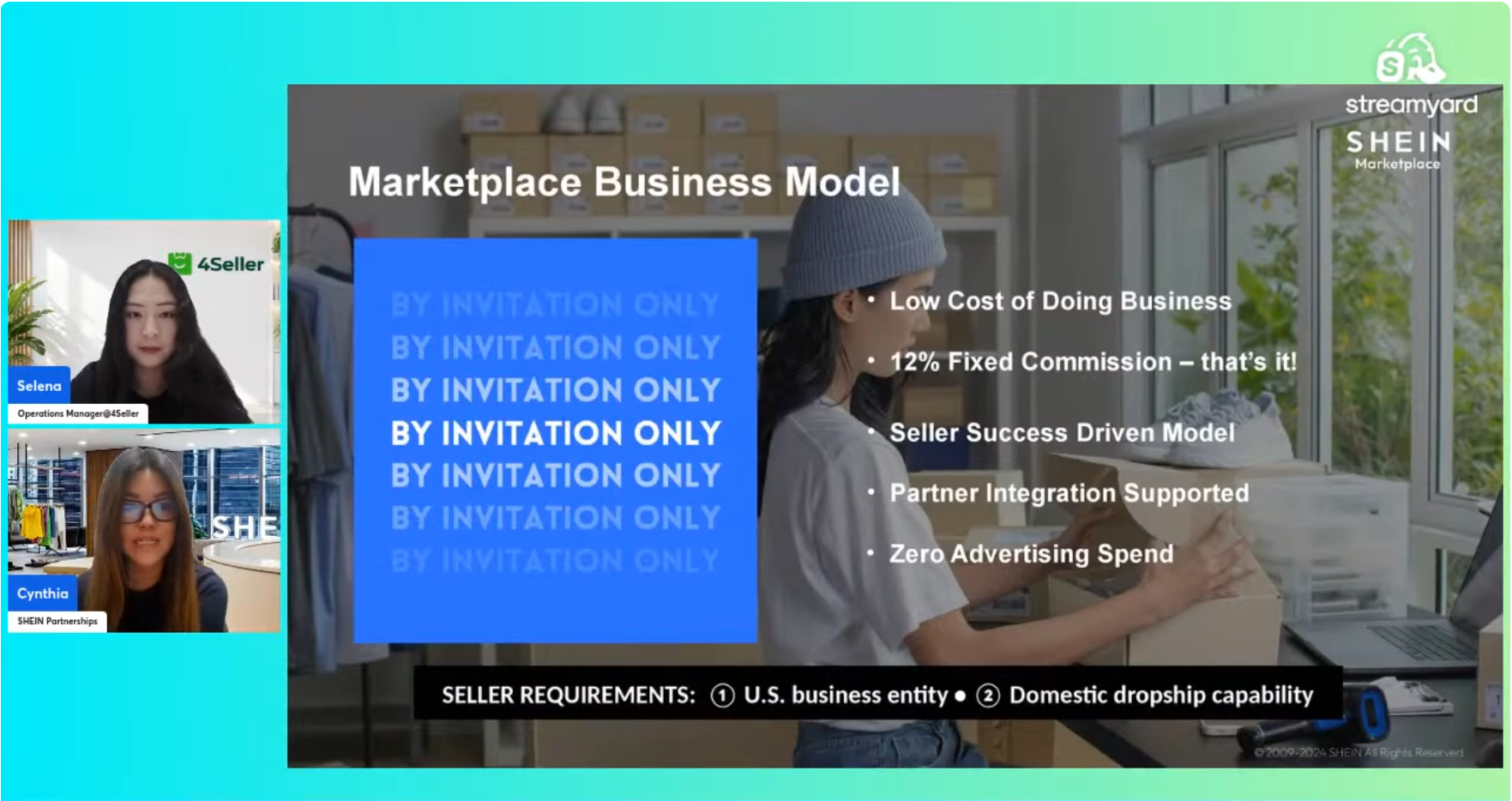
SHEIN may request additional information during onboarding and product review. Brand authenticity is also an important checkpoint when listing products.
For the latest requirements, visit the official SHEIN Marketplace seller registration page.
How to apply and access SHEIN Seller Hub
The process generally follows four steps:- Apply: Submit your business information through the official SHEIN seller application.
- Verify: Work with SHEIN's team to complete document verification and onboarding.
- List: Upload your products through Seller Hub, an API connection, or an approved solution provider.
- Ship and get paid: Set up fulfillment and manage orders according to SHEIN's shipping requirements.
If you're searching for SHEIN seller login, start with the official SHEIN Marketplace website.
Note: Seller eligibility and documentation requirements can change. Always confirm the latest rules with SHEIN before applying.
3. High-Growth & Top-Performing Categories
SHEIN is widely associated with fashion, but its Marketplace also welcomes products across several adjacent categories.During our webinar, SHEIN highlighted three major product groups.
Fashion, footwear, and accessories
Apparel, shoes, and accessories remain central to SHEIN's customer base. Brands with products that fit shoppers' styles and preferences may find opportunities to reach a relevant audience.Beauty, cosmetics, and personal care
Beauty products, fragrances, cosmetics, and personal care products are other categories highlighted by SHEIN.Our webinar featured Mona, a fragrance seller who used 4Seller to expand an existing Amazon catalog to SHEIN.
Lifestyle and consumer electronics
SHEIN's audience also shops for lifestyle products and electronics, including products that complement everyday routines and personal interests.The key takeaway: Don't assume SHEIN is only for clothing. If you already sell established products in a suitable category, exploring SHEIN could be a way to diversify your marketplace presence.
Product eligibility, brand authorization, and applicable category policies should always be checked before listing.

4. Seller Story: How Mona Migrated 1,300+ Products in 1 Hour
Before the peak season rush, fragrance seller Mona faced intense competition and rising ad costs on Amazon. Looking to diversify onto SHEIN, she needed to migrate over 1,300 catalog SKUs without wasting weeks on manual data entry.How 4Seller helped
Using 4Seller's listing migration tools, Mona was able to copy more than 1,300 listings to SHEIN in approximately one hour.The workflow included:
- Choose the source catalog: Select the existing products to migrate from another supported sales channel.
- Match categories with AI: Use AI-assisted category matching to map products to SHEIN's category structure.
- Transfer listing information: Copy available product information and images, with image resizing to meet platform requirements.
Instead of rebuilding every listing from scratch, Mona could prepare a much larger catalog in a fraction of the time and launch in time for key SHEIN campaigns ahead of peak season.
Her experience demonstrates an important advantage of multichannel operations: you can expand your reach without multiplying every manual task.
If you're already selling on Amazon, Walmart, or Shopify, 4Seller can help you prepare existing product information for expansion to SHEIN, subject to category matching and listing requirements.
5. How to Prepare Your SHEIN Store for BFCM with 4Seller
During peak season, sellers also need to maintain accurate inventory, process growing order volumes, and ship on time.4Seller brings product listings, inventory, orders, and fulfillment workflows together in one system.
4Seller currently supports more than 60,000 merchants and connects established marketplaces such as Amazon, Walmart, and Shopify with growing channels including SHEIN and TikTok Shop. 4Seller is free to use, with no hidden fees.
Here's how to prepare your operations before peak season.
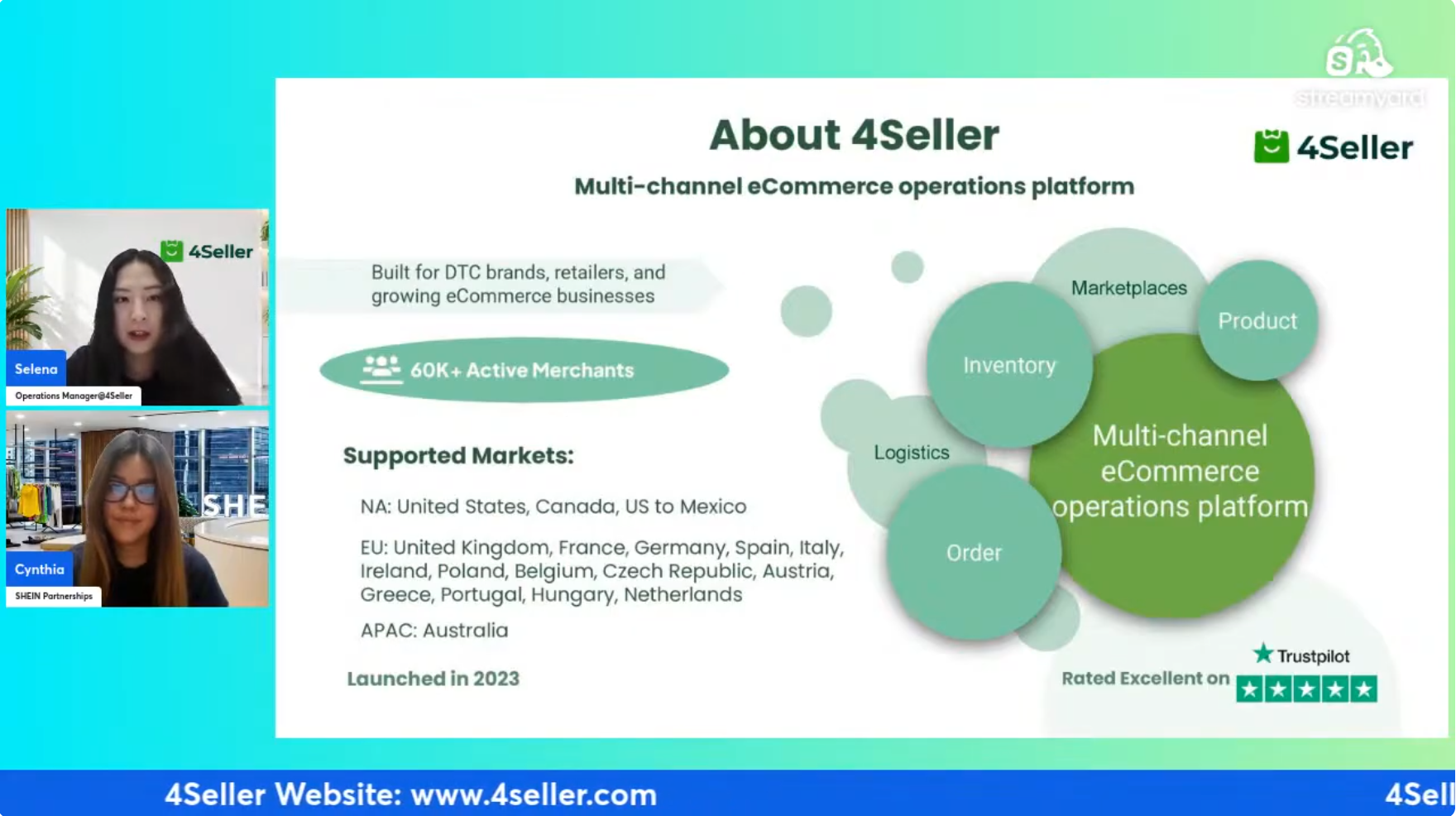
Key Capabilities Across Core Workflows:
A. Product Listings & Catalog Management
- Multi-Channel Migration & Shopify Integration: Copy existing listings from supported channels to SHEIN instead of manually recreating each product.
- Match categories with AI: Simplify category mapping during listing migration.
- Adjust images: Resize product images to meet the destination platform's requirements.
- AI Listing Generator: Auto-optimize titles, search keywords, and descriptions in seconds to boost organic search rankings on SHEIN.
- Product Scrape & Universal Catalog: Collect product data and push updates across all sales channels simultaneously with a single click.
- Review hero products: Identify your priority products and confirm their listing information and availability before BFCM.
B. Real-Time Inventory Synchronization
Inventory errors can become especially costly during BFCM.Imagine selling the same product on SHEIN, Amazon, Shopify, and TikTok Shop. If one channel sells the last available unit but the other channels still show stock, you may receive orders you cannot fulfill.
4Seller helps manage shared inventory across connected sales channels.
With SHEIN inventory synchronization:
- Stock updates can be synchronized across connected channels through webhook-based integration.
- When an order comes in, inventory can update across connected stores within seconds.
- Safety stock buffers help prevent your available inventory from falling below a set threshold.
Accurate inventory helps you protect the customer experience while selling across more channels.
C. Order Processing & Shipping Automation
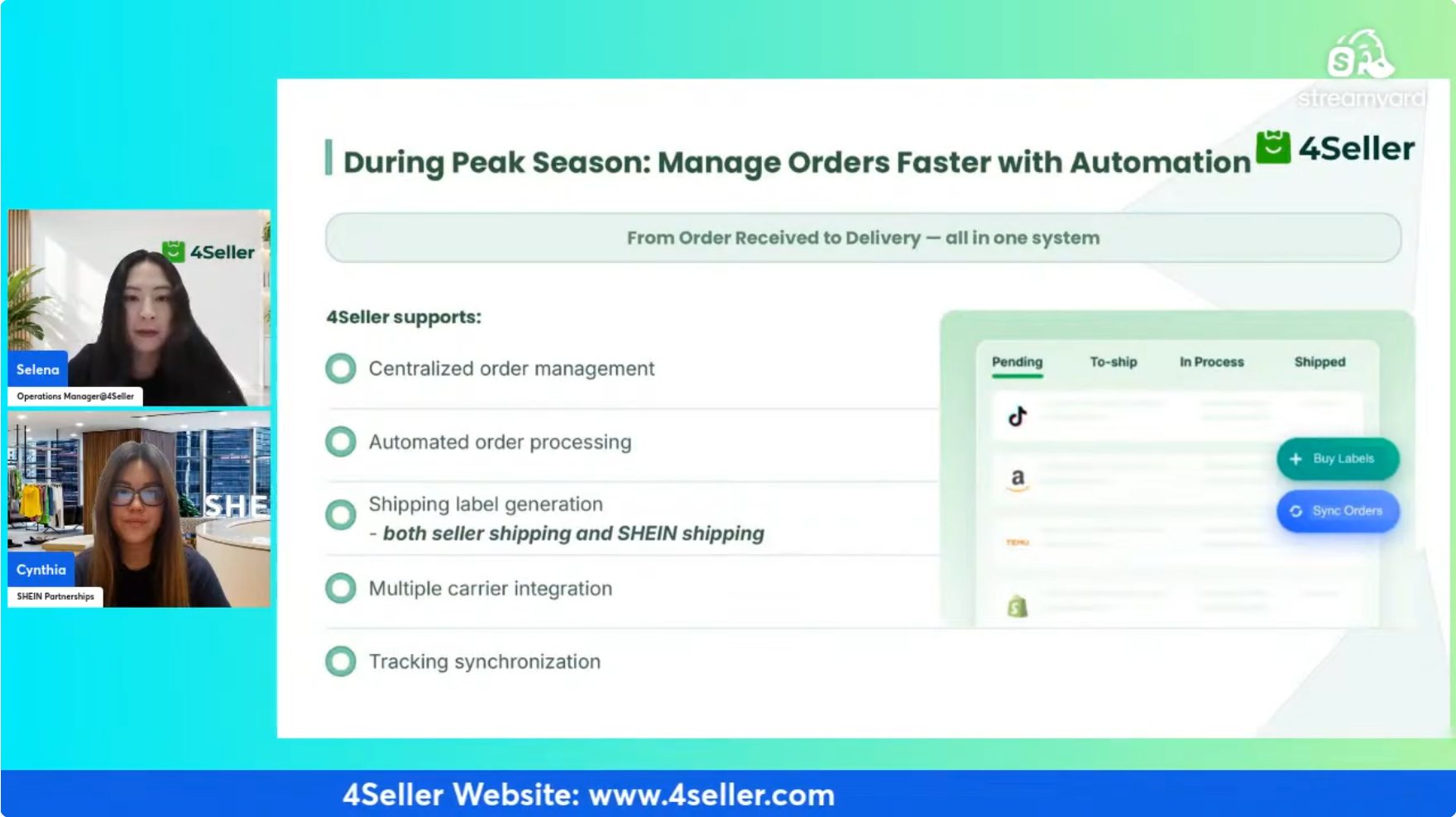
During BFCM, checking each seller center separately can slow down your team.- Unified Order Management: 4Seller lets you manage SHEIN orders alongside orders from other connected marketplaces in one dashboard.
This is particularly useful for sellers operating several storefronts or managing high order volumes with a small team.
For SHEIN sellers, supported workflows include SHEIN Shipping and Seller Shipping.
- Logistics Automation Rules: Auto-generate shipping labels based on destination, weight, or cost rules, automatically pushing tracking numbers back to SHEIN.
D. Multi-Channel Fulfillment (FBA, WFS, 3PL & MCF)
You don't necessarily need to store every product in a new warehouse when expanding to another marketplace.- FBA / WFS Stock Utilization: You don't necessarily need to store every product in a new warehouse when expanding to another marketplace.
It also supports Amazon Multi-Channel Fulfillment (MCF) and Walmart Multichannel Solutions (MCS).
- Automated Workflow Routing: Orders placed on SHEIN are automatically routed to your FBA warehouse for seamless picking and packing.
Fulfillment options depend on your account setup, marketplace policies, and service eligibility. Confirm the applicable requirements before launching.
6. A BFCM Preparation Checklist for SHEIN Sellers
Before traffic and orders increase, use this checklist to review your operations.- Store connection: Connect your SHEIN store to 4Seller and confirm that the connection is active.
- Listings: Migrate your products and review categories, images, descriptions, and variants.
- Hero products: Identify priority products and verify that enough stock is available.
- Inventory: Test synchronization across all connected channels and set safety stock buffers.
- Orders: Review your order-processing workflow and prepare for higher volumes.
- Shipping: Check carrier settings, label purchasing, logistics rules, and tracking synchronization.
- Fulfillment: Confirm warehouse capacity and test your MCF, MCS, or 3PL workflows where applicable.
- Support: Contact 4Seller support if you need help connecting your store or preparing your listings.
7. Frequently Asked Questions (Q&A)
What is SHEIN Marketplace?
SHEIN Marketplace is SHEIN's third-party marketplace, launched in 2023. It enables approved brands and sellers to offer products to SHEIN shoppers across categories including fashion, beauty, personal care, lifestyle, and electronics.How to Sell on SHEIN Marketplace?
To become a seller on SHEIN, apply through the official SHEIN Seller Portal (seller-us.shein.com/signup). You will need to submit your business details, tax identification (W-9), corporate documents, and trademark proofs. Once verified by an account manager, you can set up your store, upload products, and begin selling.How do I access SHEIN seller login?
Approved sellers can access SHEIN Seller Hub through the official SHEIN Marketplace website. Seller Hub provides tools for managing listings, inventory, orders, and storefront performance.Does SHEIN integrate with Shopify?
SHEIN supports product uploads through solution providers and API connections. Shopify sellers can use a supported SHEIN Shopify integration workflow to transfer product information and manage related operations. With 4Seller, merchants can connect supported sales channels and simplify product migration, inventory management, and order fulfillment.How can I list products on SHEIN faster?
You can use 4Seller to migrate listings from supported sales channels, transfer available product information, match categories with AI, and resize images according to platform requirements. This can significantly reduce the manual work involved in launching a large catalog.Can I use Amazon FBA to fulfill SHEIN orders?
Yes. Eligible sellers can use Amazon Multi-Channel Fulfillment (MCF) to fulfill orders from SHEIN and other sales channels using eligible FBA inventory. 4Seller supports MCF workflows and can help automate eligible order routing and fulfillment steps.Can I buy SHEIN shipping labels through 4Seller?
Yes. 4Seller supports SHEIN Shipping and Seller Shipping workflows, including purchasing shipping labels directly through the platform. Eligible logistics rules can also automate label purchasing, and tracking information can be synchronized back to SHEIN after shipment.How much does 4Seller cost?
4Seller is currently free to use, with no hidden fees. Sellers can use its multichannel operations tools to manage listings, inventory, orders, and shipping. Contact the 4Seller team for help with store connections and onboarding.Watch the Full Webinar Replay
Watch the full webinar replay to hear directly from SHEIN and 4Seller about marketplace opportunities, seller onboarding, and how to prepare your operations for peak season.👉 Watch the Grow Your SHEIN Business with 4Seller Webinar Replay on YouTube
Ready to expand to SHEIN or simplify your multichannel operations before BFCM? Visit 4Seller to explore the platform or contact our team for a one-on-one demo.
All Topics
- Multi Channel Order Management
- TikTok Shop
- Amazon
- Temu
- About 4Seller
- Shopify
- Multi Channel Inventory Management
- Amazon MCF&FBA
- Seller Tips
- Listing Management
- Marketplace News
- eBay
- Amazon Shipping
- DHL Express
- Amazon MCF
- UPS
- FedEx
- Shein
- Creator Bulk Invite
- Multi-channel Store
- Inventory Sync
- GLS
- Beginner Tutorial
- Walmart WFS
- Walmart
- Seller Story
- Royal Mail
- Kaufland
- Shipping Integration
- DHL Parcel
- 3PL
- WooCommerce
- Walmart MCS
- Deutsche Post
- Shipping Label
- OTTO
- Platform Integration
- PayPal Tracking Sync
- UniUni
- Yodel
- ShipHero
- SPU Catalog
- Stripe Tracking Sync
- USPS
- AliExpress
- GOFO
- CIRRO
- Correos
- Correos Express
- DPD
- Etsy
- Evri
- FBM
- Request Review
- Logistics Rule
- CaiNiao
- BRT
- Chronopost
- Poste Italiane
- Cdiscount
- OMS
- DHL
- WFS
- ShipBob
- Price Sync
Popular Posts

 17 Dec,2024
Table of Content
Popular Posts
- 17 Dec,2024


Back to top